Presenta
Free browser-based mockup studio that turns screenshots into polished device shots and animated presentations. Everything runs locally in the tab: no sign-up, no uploads, unlimited exports, plus a one-time Pro upgrade for AI site shots and background removal.
About
Presenta launched in 2026 as an answer to a familiar frustration: every mockup tool wants a sign-up, an upload, and a subscription before you can export a single image. Presenta flips that — it’s a full mockup studio that runs entirely in the browser tab. Nothing uploads, nothing is stored on a server, and exports are free and unlimited from the first second.
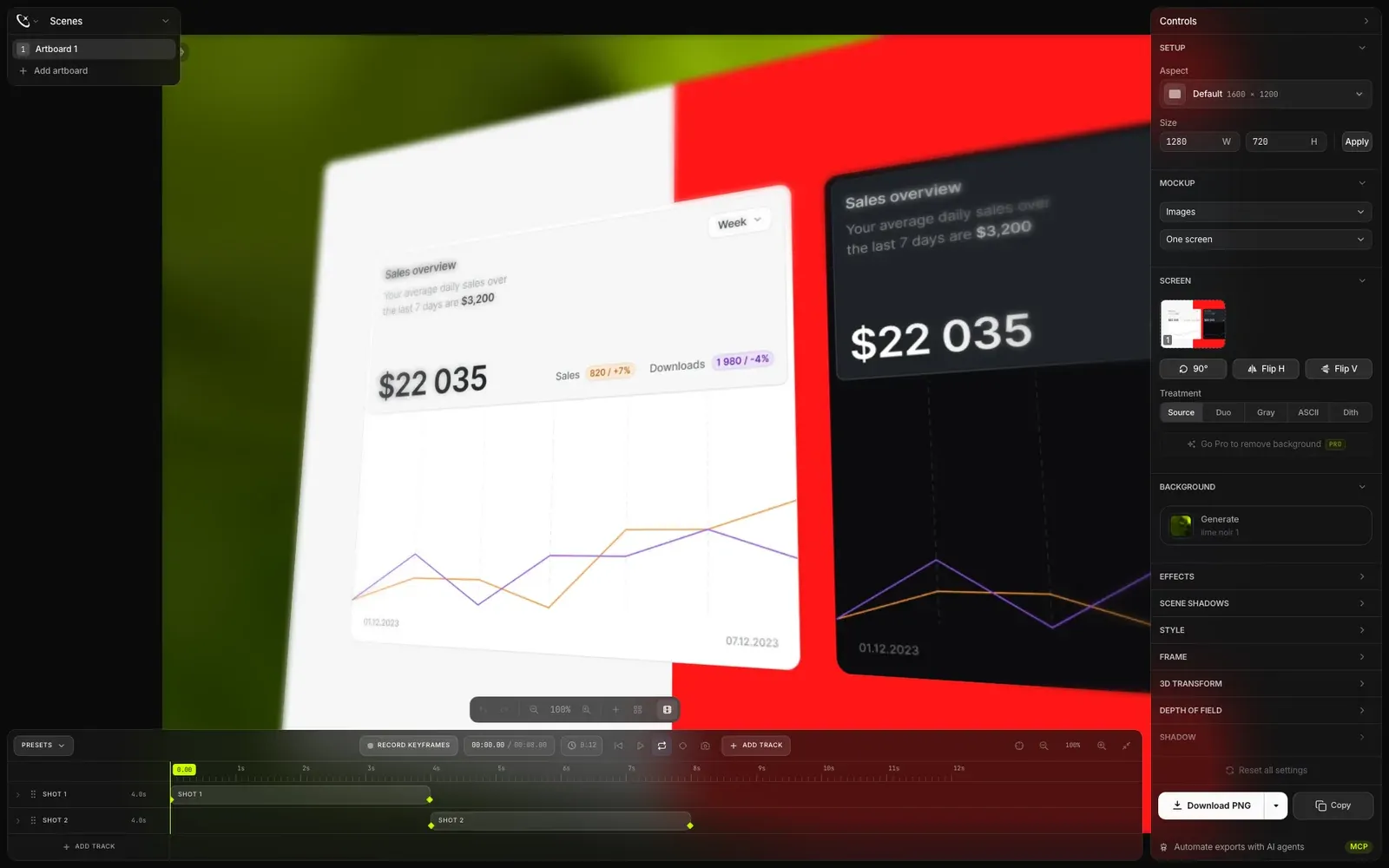
Drop in a screenshot, pick a device frame, tune the scene, and export — or go further and animate the whole shot on a video timeline.
What We Built
- Device frames — iPhone, iPad, MacBook, Apple Watch, and more, with realistic screens and materials.
- Social presets — canvas dimensions tuned for X, Instagram, LinkedIn, YouTube, and other platforms.
- 3D transforms — rotation, perspective, tilt, and depth-of-field controls for dramatic product shots.
- Effects stack — gradients, shadows, noise, blur, bokeh, light leaks, and pattern overlays.
- Multi-artboard composition — stack independent artboards into a single canvas for richer scenes.
- Text and shape layers — typography and geometric elements directly on the canvas.
- Video timeline — camera passes, keyframes, and timed layers for animated mockup shots.
- Fast export — PNG/JPG at 1x, 2x, or 3x, plus direct copy to clipboard, with keyboard shortcuts throughout.
- Presenta Pro — a $20 one-time upgrade with AI Site Shots (capture any live URL), background removal, and transparent exports. No subscription.
Product Evolution
- v1.0 — Launch. Shipped the core studio: device frames, effects, presets, and unlimited free exports with no account required.
- v1.5 — Motion. Added the video timeline with keyframes, camera passes, and timed layers — turning static mockups into animated presentations.
- Pro. Introduced a one-time $20 upgrade for AI-powered site capture, background removal, and transparent exports — deliberately avoiding the subscription model.
Technologies Used
- Fully client-side architecture — all rendering and image processing happens on-device
- Local session persistence, so work survives a page reload without an account
- Zero-backend privacy model: “Everything runs in this tab. Nothing uploads.”
Product Principles
- Private by design — screenshots never leave the user’s machine
- Zero friction — no sign-up, no watermarks, no export limits
- One-time pricing — Pro is a single $20 purchase, not another subscription
- Speed — a scene worth sharing in under a minute, keyboard-first
Project Team
- Deny Shepovalov: Creator — product, design, and development
- Published by Craftwork Design as part of the Craftwork ecosystem
Contact
For more information, visit presenta.design or reach out at denis@craftwork.design.
A mockup studio with the friction removed — Presenta proves a free, local-first tool can feel more premium than the subscription alternatives.